
Password Generator
Password Generator
Strength: -
Session History
- No passwords generated yet.
Why a Password Generator is Your Best Defense Against Cyberattacks
In an era where our entire lives—from banking to social media—are stored online, security is no longer optional. The first line of defense is always your password. However, most people struggle to create passwords that are both memorable and secure. This is where a Password Generator becomes an essential tool in your digital arsenal.
Why You Need a Secure Password Generator for Your Digital Life
In today’s interconnected world, your digital identity is only as strong as your weakest password. With cyber-attacks and data breaches becoming a daily occurrence, relying on “123456” or your pet’s name is no longer enough. This is where a professional Password Generator becomes your most important security ally.
What is a Password Generator?
A Password Generator is a tool that uses cryptographically secure algorithms to create random strings of characters. Unlike humans, who tend to follow predictable patterns, a generator creates high-entropy passwords that are nearly impossible for hackers to guess or for “brute-force” software to crack.
Why Should You Use This Tool?
1. Maximum Security through Randomness
Hackers use “Dictionary Attacks” which test common words and variations. Our tool creates passwords using a mix of uppercase letters, lowercase letters, numbers, and special symbols, ensuring no predictable patterns exist.
2. Prevents Password Fatigue
It is hard to think of a unique, complex password for every single website you join. A generator does the heavy lifting for you, providing a fresh, uncrackable string in a single click.
3. Compliance with Site Requirements
Many websites now require a specific mix of characters (e.g., at least one number and one symbol). You can customize our tool to meet these requirements instantly without the trial-and-error of manual typing.
Key Features of Our Tool
Our tool isn’t just a basic randomizer. It includes advanced features designed for your privacy:
- Auto-Clear Security: For your safety, the generated password disappears from the screen after 60 seconds. This prevents “shoulder surfing” in public places.
- Strength Meter: Get real-time feedback on how secure your new password actually is.
- Session History: Forget which one you just generated? View your recent history during your current session (stored only in your browser).
- Client-Side Processing: Your passwords are never sent to our server. Everything happens locally on your device for 100% privacy.
How to Create a Strong Password: A Step-by-Step Guide
Follow these steps to ensure your accounts are locked down tight:
- Select Your Length: We recommend at least 12 to 16 characters. The longer the password, the exponentially harder it is to crack.
- Toggle Character Sets: Ensure “Numbers” and “Symbols” are checked for the highest level of security.
- Click Generate: Hit the “Generate Secure Password” button.
- Check the Strength: Look at the Strength Meter. If it’s green and says “Strong,” you are good to go!
- Copy and Save: Use the one-click copy button and paste the password into a trusted Password Manager (like Bitwarden, LastPass, or 1Password).
Best Practices for Password Management
To stay truly safe online, follow these three golden rules:
Never Reuse Passwords
If one website is hacked and you use the same password elsewhere, the hacker now has the keys to your entire digital life. Use our generator to create a unique password for every single account.
Use a Password Manager
Since generated passwords like G&k9#pL2!zRt are impossible to memorize, a password manager is essential. It acts as a digital vault that remembers everything for you.
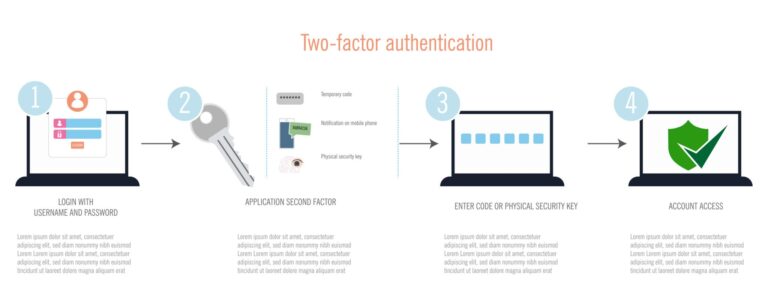
Enable Two-Factor Authentication (2FA)
Even with a perfect password, 2FA adds a second layer of defense. By requiring a code from your phone or email, you ensure that even if a hacker gets your password, they still can’t get in.
Final Thoughts
Security doesn’t have to be complicated. By using our Password Generator, you take the guesswork out of staying safe. Stop using predictable patterns and start using cryptographically secure strings today.
Frequently Asked Questions (FAQ)
Is this Password Generator safe to use?
Yes. Our tool is 100% secure because it operates entirely client-side. This means the passwords are generated in your own web browser using your device’s hardware. No data is ever sent to our servers, and we never see or store the passwords you create.
How does the Auto-Clear feature work?
The Auto-Clear Security feature is designed to protect your privacy if you are using a computer in a public space or a shared office. Once a password is generated, a 60-second timer begins. When the time is up, the password is automatically wiped from the input field to prevent anyone else from seeing it.
What makes a password “strong”?
A strong password consists of four main elements:
- Length: At least 12 characters (16+ is ideal).
- Complexity: A mix of uppercase, lowercase, numbers, and special symbols.
- Randomness: No predictable patterns or dictionary words.
- Uniqueness: It should not be used for any other account.
Why shouldn’t I just create my own password?
Humans are naturally bad at being random. We tend to use familiar dates, names, or keyboard patterns (like “qwerty”). Hackers use sophisticated software that can test millions of these predictable combinations in seconds. A generator uses a Cryptographically Secure Pseudo-Random Number Generator (CSPRNG) to ensure the result is truly random.
Should I write down the generated passwords?
We strongly recommend against writing passwords on paper or saving them in unencrypted files like Word docs or Notes apps. Instead, use a dedicated Password Manager. These tools encrypt your passwords and can even auto-fill them for you when you log in to a site.
Can a “Strong” password be hacked?
While no password is 100% “unhackable,” a 16-character random password would take a modern supercomputer trillions of years to crack using brute force. The biggest risk is usually not the password being guessed, but rather “Phishing” (being tricked into giving it away) or the website itself having a data breach.