
The Social Media Game Changer: How Google Veo 3.1 Mastering Vertical Video from Images
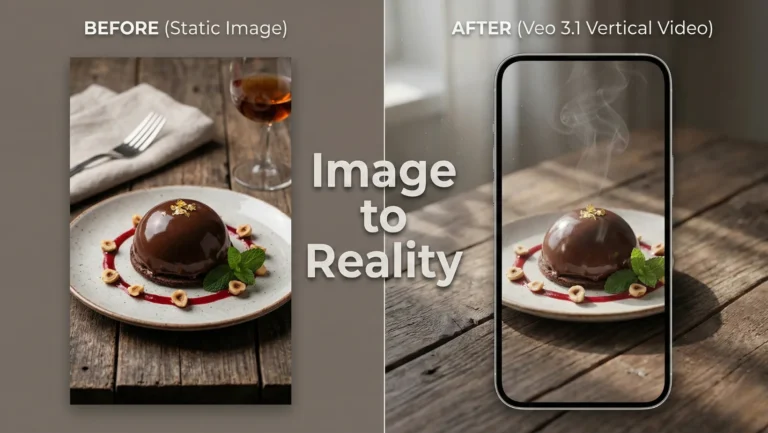
If you are a content creator, a social media manager, or just someone trying to grow a brand online today, you know the struggle. The internet has pivoted hard. Static images no matter how beautiful are often ignored by algorithms that favor movement, engagement, and watch time.
The golden ticket right now is short-form vertical video. Facebook reels, Instagram Reels, and YouTube Shorts are the undisputed kings of attention.
But creating high-quality video is hard. It requires cameras, lighting, editing skills, and, most importantly, time. We’ve all wished for a magic button that could turn our best photos into engaging videos.
Well, AI has been promising that magic button for a while. But until recently, the results were often weird. Faces would morph, backgrounds would wobble, and the “video” looked more like a fever dream than a usable piece of content.
Enter Google Veo 3.1.
Google’s latest update to its generative video model has quietly revolutionized the space. It hasn’t just added a new feature; it has fundamentally solved the biggest problem in AI video: stability.
Today, we’re diving deep into how Google Veo 3.1 vertical videos are changing the game, allowing you to transform static images into professional, consistent social media content in seconds.
What is Google Veo 3.1? The Short Version
Before we get into the vertical video magic, let’s establish what Veo actually is.
Veo is Google’s state-of-the-art generative video model. Think of it as the video equivalent of tools like Midjourney or DALL-E. You give it a prompt (either text or an image), and it interprets that data to generate a video clip.
Earlier versions of Veo were impressive tech demos. They showed an understanding of cinematic physics and lighting that was far ahead of the competition. However, like all early AI video tools, they struggled with “temporal consistency”- fancy talk for keeping things looking the same from frame one to frame sixty.
Veo 3.1 is the refinement update. It isn’t about generating 10-minute movies (yet). It’s about nailing the short-form clip with a level of realism that makes the viewer question if it was shot with a camera.
The 3.1 update specifically focuses on tightening the relationship between the input (your image) and the output (the video), ensuring that the AI doesn’t “hallucinate” new objects or distort existing ones as things start moving.
The Vertical Video Revolution: Why Format Matters
Why is Google focusing so heavily on the vertical format with this specific update? Because that’s where the eyeballs are.
We live in a mobile-first world. Over 90% of the time, human beings hold their phones vertically. When platforms like Snapchat and then TikTok exploded, they proved that users prefer immersive, edge-to-edge, full-screen experiences that don’t require rotating the device.
If you are posting horizontal (landscape) videos on Reels or Shorts today, you are actively harming your reach. You are fighting the platform’s native user interface, resulting in black bars above and below your content and a less engaging experience.
The Challenge of AI and Verticality
Until Veo 3.1, creating true vertical AI video was surprisingly difficult. Why? Because most massive AI models were trained on the history of cinema, television, and YouTube data the vast majority of which is horizontal.
When you asked older, less specialized models for a vertical video, they would often fail in predictable ways:
The Squat Effect: They would generate a wide video and then oddly squash it horizontally to fit the frame, making everyone look distorted.
The Bad Crop: They would generate a wide scene and then crop the sides awkwardly, often cutting off vital context or half the subject’s body.
Composition Failure: They struggled to understand “tall” composition, often placing the subject too low in the frame with vast amounts of empty headroom.
Google Veo 3.1 has been explicitly trained to understand vertical aspect ratios (9:16). It understands the “tall” canvas, knowing how to frame a human body, a skyscraper, or a product stack naturally within that specific space.
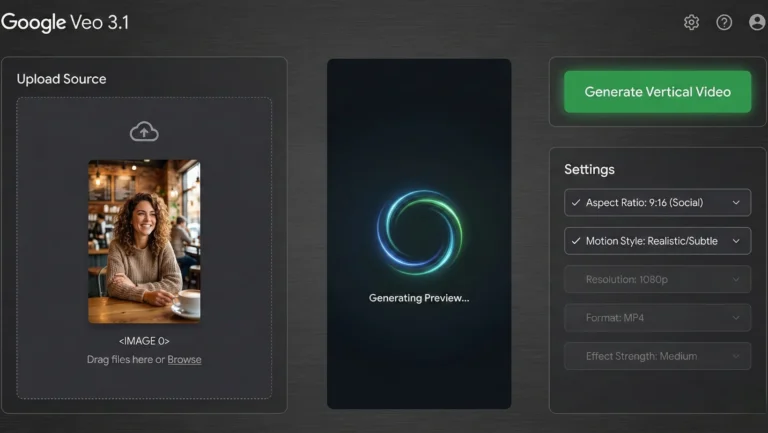
From Still to Motion: How Image-to-Video Works
This is where the rubber meets the road for marketers and creators. The most potent feature in Google Veo 3.1 is the ability to start with an image, rather than just a text prompt.
Text-to-video is incredibly fun (“Show me an astronaut riding a tyrannosaurus rex on Mars”), but it’s hard to control for branding. If you are a business selling a very specific model of sneaker, you don’t want an AI’s artistic interpretation of a sneaker; you want your exact sneaker, just moving.
The Process in Veo 3.1 works roughly like this:
The Input: You feed the model a high-resolution static image. This could be a professional product shot, a portrait, a landscape, or an architectural photo.
The Analysis: Veo 3.1 analyzes the image deeply. It identifies the core subjects, the direction of the light source, the varied textures (is that silk or cotton?), and the depth field (what’s in focus vs. blurry).
The Prediction (The Hard Part): The AI has to predict the future. Based on the still image, what should happen next in a realistic world?
If it’s a person, they should probably breathe, blink subtly, or shift their weight.
If it’s a landscape, the clouds should drift, or the trees should sway slightly in a breeze.
If it’s a product, perhaps the camera should slowly orbit around it to show dimension.
The Generation: Veo 3.1 generates dozens of new frames that interpolate motion between the static starting point and that predicted future state, all while adhering strictly to the vertical frame constraint.
The result is usually a 5-to-10-second clip where your image simply comes alive. It’s not just zooming in on the photo (the old “Ken Burns effect”). It is generating actual, realistic 3D motion based on 2D data.
The Core Breakthrough: "Improved Consistency" Explained
If you take nothing else away from this article, understand this concept. Consistency is the difference between a cool tech demo and a usable professional tool.
In the context of generating Google Veo 3.1 vertical videos, what does “improved consistency” actually mean in practice? To appreciate it, we need to look at the failures of previous generations.
The “Dream Logic” Problem (The Old Way)
Before Veo 3.1, if you gave an AI an image of a cat sitting on a brick wall and asked for a video, you might get results plagued by “dream logic”:
Morphing: The cat turns its head, but as it does, its ear temporarily disappears or changes color before reappearing.
Background Instability: The brick wall behind the cat starts shimmering, or the lines between the bricks start wiggling like snakes.
Identity Crisis: The cat’s face subtly changes structure from frame 10 to frame 20. It looks like a different cat by the end of the clip.
This is poor “temporal stability.” The AI forgets what the baseline reality of Frame 1 was by the time it gets later into the video.
The Veo 3.1 Solution (The New Way)
Google Veo 3.1 has vastly improved its “memory” over time. It has a much stronger grasp of object permanence. When creating vertical videos from an image, the model locks onto the defining characteristics of the subject and environment.
Identity Preservation: If you upload a photo of a specific person, the resulting video looks exactly like that person moving. Their nose shape doesn’t change when they turn slightly.
Background Solidity: The background remains stable. If there is a complex pattern on wallpaper behind your subject, that pattern stays rigid; it doesn’t warp as the camera moves.
Coherent Lighting: If your source image has strong sunlight coming from the top right, the generated movement maintains shadows consistent with that specific light source throughout the movement.
This consistency is what makes the footage usable for professional brands. It no longer looks like an “AI trick.” It just looks like video.
Real-World Use Cases: Who Needs This Technology?
The ability to create consistent Google Veo 3.1 vertical videos from static assets is a massive unlock for several specific industries.
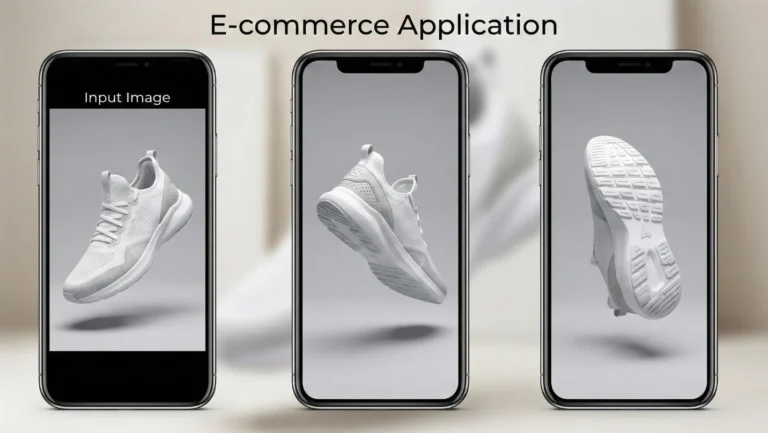
1. E-commerce and Product Marketing
This is perhaps the most immediate financial application. E-commerce brands have thousands of high-quality static product photos on their Shopify or Amazon stores.
The Veo 3.1 Fix: Take those static white-background shots of jewelry, electronics, or footwear. Use Veo 3.1 to add a slow, luxurious camera orbit, a subtle light shimmer across a diamond surface, or a slow spin. Suddenly, you have thousands of ready-made Reels and Shorts that showcase the product’s dimensionality better than a still image ever could.
2. Real Estate Agents
Listing photos are necessary, but they can be boring on social media. Video walkthroughs sell houses, but they are expensive and time-consuming to produce for every single property.
The Veo 3.1 Fix: Take the “hero shot” of the living room. Veo 3.1 can generate a slow, smooth camera pan across the room, giving a sense of depth and space. A static exterior shot of a home can become a short video with trees gently blowing in the wind and clouds moving, making the property feel alive and inviting.
3. Travel and Lifestyle Influencers
You visited an incredible location, but you only got the perfect photo, not the video, because you were trying to be present in the moment.
The Veo 3.1 Fix: That stunning photo of you looking out over a canyon or sitting by the ocean can be animated. The AI can add subtle wind to your hair, slow movement to the water, or drifting clouds, turning a memory into a shareable “vibe” video perfect for TikTok sounds.
4. Digital Artists and Photographers
How do you showcase a portfolio of still images on platforms that demand video feed dominance?
The Veo 3.1 Fix: Animate your artwork. Bring the characters in your fantasy illustrations to life with subtle breathing motions, or add environmental effects like rain or fog to your landscape photography.
The Human Touch: Why AI Won't Replace Creativity
Whenever tools like Veo 3.1 are released, there is a wave of panic in the creative community. “Is this the end of videographers? Will human creativity die?”
Absolutely not. In fact, tools like this enhance human creativity by removing technical barriers to entry.
Google Veo 3.1 is an engine. It needs fuel. You provide the fuel.
The quality of the output is still entirely dependent on the quality of your input and your creative vision. If you feed Veo 3.1 a mediocre, poorly lit, badly composed photo, you will get a mediocre, poorly lit, badly composed video just one that moves.
The human element shifts from the execution (holding the gimbal steady, nailing the focus pull) to the ideation (choosing the perfect subject, composing the initial shot with intention, deciding on the mood of the motion).
Veo 3.1 doesn’t know why a video is emotionally resonant. It just knows physics and pixels. The creator still needs to understand storytelling to use these AI-generated clips effectively in a wider social media strategy.
Looking Ahead: The Future of Vertical Video
Google Veo 3.1’s ability to create consistent vertical videos from images is a significant milestone, but it’s still just the beginning of this technology curve.
We are rapidly approaching a point where the distinction between “photo” and “video” will blur entirely on social media. In the near future, we likely won’t post “static” images at all. Every moment we capture will probably be rendered by our phones or the platforms themselves as a subtle, high-quality “living photo” loop.
As these AI tools become faster, cheaper, and eventually integrated directly into our smartphone cameras and social apps, the barrier to entry for high-end video production will drop to near zero.
For now, Google Veo 3.1 has given creators a powerful new weapon in the fight for attention. By mastering the art of turning static images into consistent, engaging vertical videos, you can stay ahead of the algorithmic curve and keep your audience scrolling and watching.
Frequently Asked Questions (FAQ)
Q: Is Google Veo 3.1 available to the general public right now?
Access to Google’s most advanced generative models often rolls out in stages. It sometimes starts with trusted testers, researchers, or through specific Google Cloud platforms like Vertex AI for enterprise customers. Keep an eye on Google’s official AI blogs and Google DeepMind announcements for widespread release information.
Q: How long are the vertical videos generated by Veo 3.1?
Currently, high-fidelity generative video models excel at short durations to maintain that crucial consistency. They usually range from 3 to 10 seconds. This length is perfect for social media loops, intros, B-roll, or Shorts using trending audio.
Q: Can I control the specific camera movement in Veo 3.1, or is it random?
While you start with an image, advanced interfaces for models like Veo usually allow you to provide text prompts alongside the image to guide the motion. You might add prompts like “slow pan right,” “zoom out slowly,” or “make the subject smile subtly” to direct the AI’s output.
Q: Does Veo 3.1 work with AI-generated images, or only real photos?
It works beautifully with both. You can create a workflow where you generate a stunning concept image using Midjourney or DALL-E, and then feed that synthetic image into Veo 3.1 to bring it to life. This creates a 100% AI-driven content production pipeline.